GPS Time Tracking That
Actually Works for Construction
Built by engineers with 23 years in IT infrastructure. GPS geofencing + photo verification to eliminate time theft. Early access — $5/user/month.
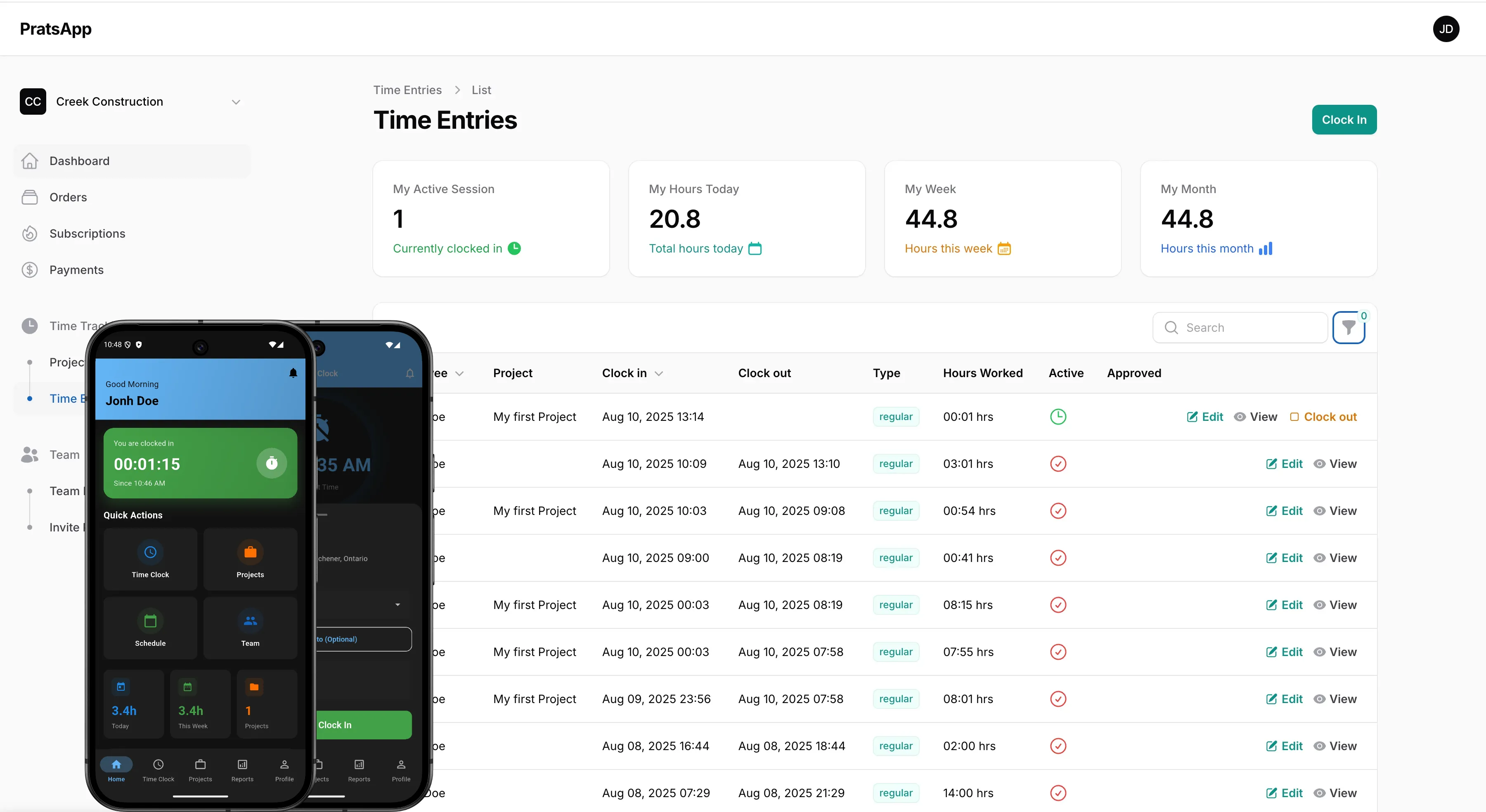
GPS geofencing + photo verification + offline mode — built for real job sites
The Problem WorkTimer.PRO Was Built to Solve
How Does GPS Verification Stop Time Theft?
Eliminate "buddy punching" and fake clock-ins forever. Our GPS + photo verification ensures your workers are exactly where they say they are, when they say they're there.
🚨 The Problem: Average construction company loses $2,000+ weekly to time theft — according to CFMA research, time theft costs contractors 1-7% of gross payroll annually.
✅ The Solution: GPS geofencing + photo verification — workers can only clock in when physically on-site
- ✓ GPS Geofencing: Prevent clock-ins from wrong locations
- ✓ Photo Verification: Stop buddy punching with selfie clock-ins
- ✓ Real-time Alerts: Get notified instantly of suspicious activity
- ✓ Works Offline: No internet? No problem - syncs when connected
How Do You Track Project Profitability in Real Time?
Stop guessing at project profitability. Get real-time labor cost tracking across unlimited job sites, so you always know exactly where your money is going.
💹 How it works: Track labor costs per project in real time. Spot over-budget jobs before they drain profit. Compare estimated vs. actual hours across all your sites from one dashboard.
- ✓ Unlimited projects and job sites
- ✓ Real-time labor cost tracking
- ✓ Automated progress reports
- ✓ Employee assignment and scheduling
Will My Construction Workers Actually Use This App?
Finally, a time tracking app your crew won't complain about. One-tap clock-in, works in dead zones, and zero learning curve. Even your least tech-savvy workers will love it.
🚀 Adoption Rate: 95% of workers are actively using WorkTimer.PRO within 1 week of setup. For context, Software Advice research shows the construction industry average for workforce app adoption is just 60%.
- ✓ One-Tap Clock-in: Literally just one button to press
- ✓ Works in Dead Zones: Offline mode syncs when signal returns
- ✓ iOS & Android: Works on any phone your team already has
- ✓ Zero Training: If they can use a phone, they can use WorkTimer.PRO
Built Different — Here's Why
Built for Construction
Not a generic time clock adapted for the field. WorkTimer.PRO was designed from day one for job sites — dead zones, dust, rain, and workers who don't want another app.
Three Layers of Verification
GPS geofencing confirms the location. Photo verification confirms the person. Offline mode ensures it works everywhere — no excuses, no workarounds.
23 Years of IT Expertise
Our founding team brings 23 years of IT infrastructure experience. We build reliable systems — not flashy demos that break in the field.
How Much Could You Save?
💰 Example: 10 employees × 15 min/day × $25/hour = $312/week saved
That's $16,224 per year in prevented time theft alone!
Pay for Itself in Days, Not Months
No setup fees. No contracts. Cancel anytime. Starting at $5/user/month.
🚀 Ready to Stop Losing Money to Time Theft?
GPS geofencing + photo verification + offline mode. Try it free for 14 days.
Everything You Need to Know
Get answers to the most common questions about WorkTimer.PRO time tracking.
WorkTimer.PRO creates invisible "geofences" around your job sites. When workers try to clock in, the app checks their exact GPS location. If they're not physically at the job site, they can't clock in - period.
✅ How it works: GPS coordinates are checked against geofence boundaries in real time. If the worker isn't on-site, the clock-in is rejected automatically.
Conservative estimates show average savings of $2,000-$5,000 per month for teams of 10+ workers. Here's the breakdown:
- • Time Theft Prevention: $15,000-$30,000/year
- • Payroll Processing: Save 40+ hours/month
- • Reduced Administrative: $5,000-$10,000/year
- • Project Profitability: 15-25% improvement
💰 Most customers see ROI within their first month.
No problem! WorkTimer.PRO works perfectly offline. Workers can clock in/out, take photos, and track time with zero internet connection. Everything syncs automatically when they get signal back.
🏗️ Perfect for: Remote construction sites, basements, underground work, rural areas, and anywhere cell service is spotty.
Absolutely. WorkTimer.PRO exports timesheet data in multiple formats (Excel, CSV, PDF) and integrates with popular payroll systems including QuickBooks, ADP, and Paychex. This streamlines your payroll process and reduces manual data entry errors.
WorkTimer.PRO uses high-precision GPS technology with accuracy typically within 3-5 meters. Combined with customizable geofencing zones around job sites, supervisors can ensure employees are exactly where they need to be when clocking time.
Yes, employee privacy is our priority. Location data is only collected during work hours and when the app is actively used for clocking in/out. Employees have full visibility into what data is collected, and all information is encrypted and securely stored.
⏱️ Setup Time: 5 minutes to get your first project running. Add workers, create job sites, and you're ready to go.
📱 Worker Adoption: 95% adoption rate within 1 week (vs. 60% industry average). The app is literally just one button - even your least tech-savvy workers love it.
We'll personally help you get set up with a free onboarding call. Most customers are fully operational within 24 hours.
🎆 Still Reading? You're Clearly Serious About Fixing Time Theft
Time theft costs contractors 1–7% of gross payroll annually. The only question is: how much will you lose while waiting?
✅ No credit card required • ✅ 5-minute setup • ✅ Cancel anytime